Every result below comes from Sumi's own engine, the one inside the app, using its
built-in exchange rates.
8
Money
WorkDinner
1 rent = 2 450 EUR 2 450 €
2 bills = 310 EUR 310 €
3 total = rent + bills 2 760 €
4 total in usd 2 997,39 $
5 Rp 150rb × 3 450 000 Rp
6 # trip to tokyo
7 flight = 860 USD 860 $
8 hotel = 18 000 JPY × 5 90 000 ¥
9 flight + hotel in eur 1 341,79 €
10~
9 linesTotal2 760 €
A currency converter for about 160 currencies and 20 cryptocurrencies. Rates refresh every 15 minutes and keep working offline. Shortcuts like k, rb, jt and lakh.
Work
DinnerUnits
1 rate = 25 USD/h 25 $/h
2 week = 38 h 38 h
3 total = rate × week 950 $
4 8 h × 5 days 40 h
5 days until 25 dec 45 d
6~
5 linesTotal950 $
Hours, days and hourly rates multiply the way you say them. Count down to any date, or add a time zone.
Dinner
UnitsMath
1 dinner = 186 EUR 186 €
2 tip = dinner × 10% 18,60 €
3 total = dinner + tip 204,60 €
4 each = total / 4 51,15 €
5~
4 linesTotal204,60 €
Split any total. Tap the result to name people, mark who paid and give someone a bigger share.
Units
MathAnd more
1 run = 5 km 5 km
2 run × 3 in miles 9,32 mi
3 20 °C in F 68 °F
4 180 cm in feet 5,91 ft
5 3 sq m in sqft 32,29 ft²
6~
5 linesResult32,29 ft²
A unit converter for length, weight, volume, area, speed, temperature and data. Convert anything with in.
Math
And moreMoney
1 sqrt 144 + 2^5 44
2 18% of 240 43,20
3 20% off 80 USD 64 $
4 240 + 15% 276
5 0xFF in bin 0b11111111
6~
5 linesResult0b11111111
Percentages the way you say them, powers, roots, functions, hex and binary.
And more
MoneyWork
1 search = everything titles · lines · results
2 # sections fold to their subtotal
3 costs = running per hour · per month
4 widgets = on Home · Lock Screen
5 sync = icloud iPhone, iPad and Mac
6 themes = 6
7~
6 lines
No account, no ads, no tracking. Your sheets stay on your device, or in your own iCloud.
9
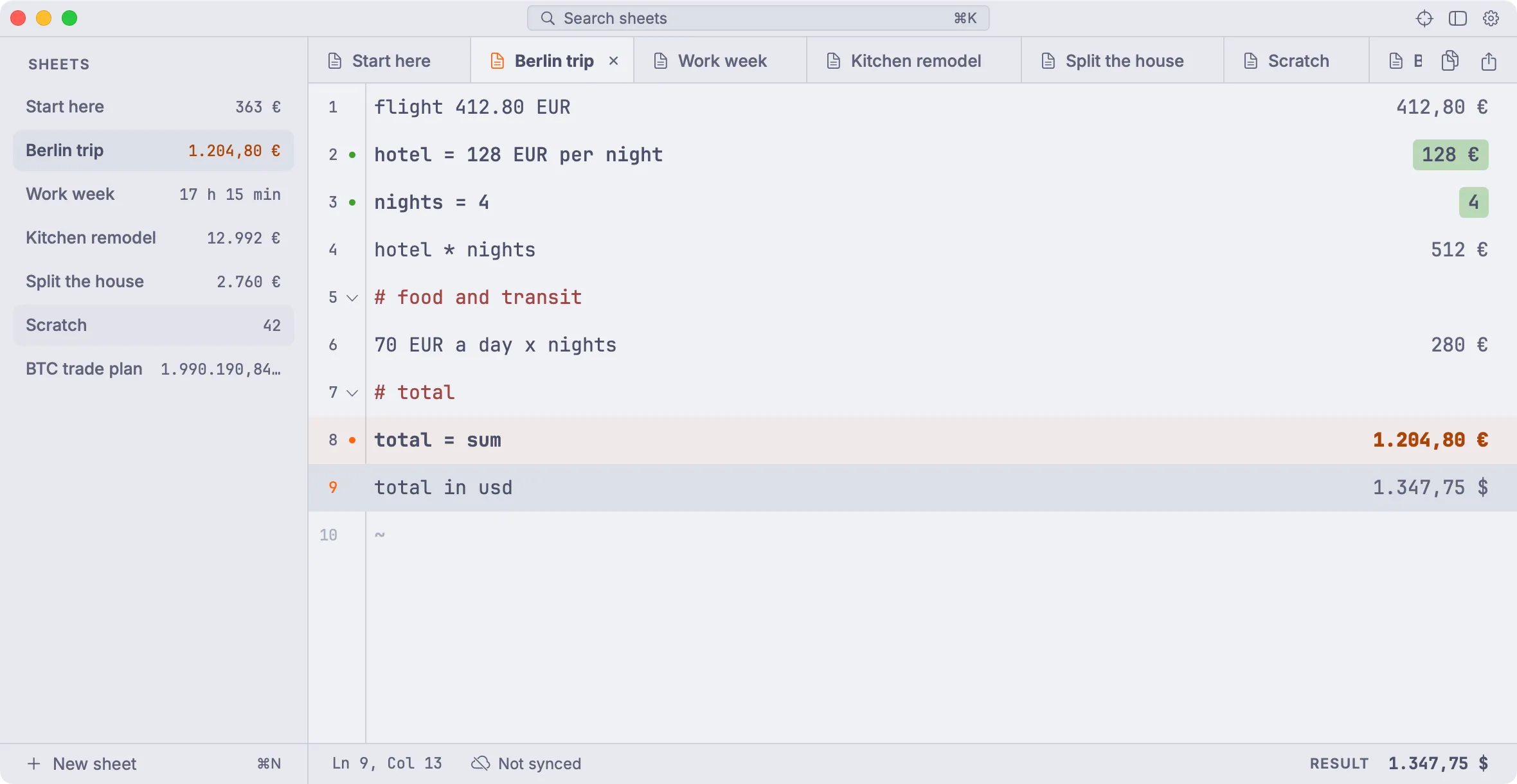
# on the mac too
10
The same sheets, on your Mac.
sidebar=every sheet’s total
⌥ Space=quick sum from the menu bar
⌘K=search all sheets
icloud=in sync with your iPhone
11
12
# a real session · a trip budget, EUR to USD
13
One sheet, start to finish.
A screen recording from the iPhone app, 38 seconds, no sound.
budgetA hotel in euros and flights in dollars, added up under a name.
convertThe total in US dollars, then split three ways.
datesDays until a date, and a work week in hours.
nightSettings, switching to the dark Espresso theme.
14
# pricing
15
Free to start. Pay once for Pro.
16
$7.99once for iPhone, iPad and Mac. No subscription, ever.
todayDownload free
Every unit and currency with live rates, unlimited lines, 3 sheets. No account.
days 1-7Try all of Pro
Unlimited sheets, iCloud sync, all 6 themes, every widget, pins and share as image.
day 7Keep it for $7.99, once
Or stay free. Nothing is deleted: sheets past the first 3 turn read-only.
17
Plans
freepro
1 lines unlimited unlimited
2 units, currencies all, live rates all, live rates
Kept for three years, a subscription costs about 13 times Pro. Computed by Sumi.
18
# questionsFrequently asked questions about Sumi
19
What is Sumi?
Sumi is a notepad calculator for iPhone, iPad and Mac. Each line you write is calculated and the answer shows beside it. Name a value, like rent = 2450 EUR, use it on later lines, and change one number to update the rest. It is also a currency converter and unit converter: write 100 USD in EUR or 5 km in miles.
20
How is Sumi different from Soulver or Numi?
Like Soulver and Numi, Sumi is a notepad calculator: you write plain lines and each one shows its answer. Sumi is made for iPhone first and works offline, with about 160 currencies and 20 cryptocurrencies, a bill splitter that tracks who has paid, and Home Screen and Lock Screen widgets. Sumi Pro is a single $7.99 purchase in the US, with no subscription.
21
Does Sumi work offline?
Yes. Every calculation runs on your device. Currency conversion uses live exchange rates when you are online, for free, and built-in rates when there is no connection.
22
Which currencies and units does it know?
About 160 world currencies, including USD, EUR, GBP, JPY, IDR, SGD, INR and AUD, and about 20 cryptocurrencies such as Bitcoin and Ether, plus weight, length, volume, area, speed, angles, temperature, data and energy. It also handles time and dates, like 7h 30min × 5 or days until 25 dec, time zones, like 2:30 pm HKT in Berlin, math like sqrt 16, 2 ^ 10 or 255 in hex, and Indonesian amounts like 150rb and 2jt.
23
Can Sumi split a bill?
Yes. Write a line like dinner / 4, tap the answer and choose Split 4 ways. Name each person, tick off who has paid, or change one share and the others adjust to keep the total. Sharing the split as text is free; sharing it as an image is part of Sumi Pro.
24
How much does Sumi cost?
Sumi is free with up to 3 sheets, live exchange rates, two themes (Cream and Espresso) and one small widget. Sumi Pro is a one-time purchase of $7.99 in the US, with a 7-day free trial and Family Sharing. It adds unlimited sheets, iCloud sync between your iPhone, iPad and Mac, four Catppuccin themes (Latte, Frappé, Macchiato and Mocha), every widget size, pinning, sharing sheets as images and app icons. One purchase works on all of them. There is no subscription.
25
Is my data private?
Your sheets are stored on your device. If you turn on iCloud sync (Sumi Pro, off by default), they also go to your own private iCloud account, which we cannot read. Sumi has no account, no ads and no analytics, and nothing you write is sent to us.
26
Which devices does Sumi run on?
iPhone with iOS 17 or later, iPad with iPadOS 17 or later, and Mac with macOS 15 or later. It is a free download on the App Store, and Sumi Pro bought on one works on the others.